Updates:
The National Examination Board (NEB) has published the retotaling results for those students who were not satisfied with the results of the Secondary Education Examination (SEE) 2081, and applied for re-totaling.
Downloads:
SEE-2081-1st-Lot-Retotaling-Result-NEB.pdf
SEE-2081-2nd-Lot-Retotaling-Result-NEB.pdf
SEE-2081-3rd-Lot-Retotaling-Result-NEB.pdf
SEE-2081-4th-Lot-Retotaling-Result-NEB.pdf
SEE-2081-5th-Lot-Retotaling-Result-NEB.pdf
SEE-2081-6th-Lot-Retotaling-Result-NEB.pdf
View the retotaling application notice:
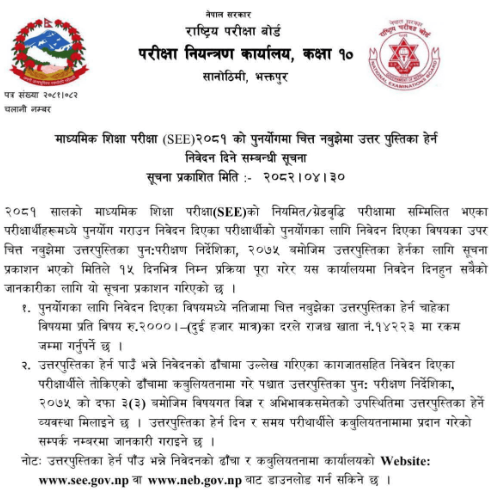
The National Examination Board (NEB) has announced that students who are not satisfied with the results of the Secondary Education Examination (SEE) 2081, even after re-totaling, can apply to view their answer sheets.
The notice, published on 15th August 2025, states that applications must be submitted within 15 days by 30th August 2025.
How to Apply for Answer Sheet Viewing
- Only students who had previously applied for re-totaling are eligible.
- A fee of Rs. 2000 per subject must be deposited in Revenue Account No. 14223.
- The application must be submitted in the prescribed format along with the required documents.
- Students must also sign a declaration form.
Where to Get the Forms
The application form and declaration format can be downloaded from:
View the official notice:
The National Examination Board, Office of the Controller of Examinations (Grade 10), Sanothimi, Bhaktapur, has opened the application process for re-totaling of SEE 2081 results.
Students who appeared in the regular or grade increment examination of 2081 and are dissatisfied with their obtained grades can apply for re-totaling by submitting an online application by 5:00 PM on Ashadh 23, 2082.
Step-by-Step Procedure to Apply:
- Visit exam.neb.gov.np/see and go to the Student Payment section
OR - Visit www.see.gov.np and click on “Apply for Retotal for SEE 2081”
- Enter your Symbol Number and Date of Birth (Do not include the alphabet following the symbol number)
- Select the subject(s) for which you want re-totaling
- Make the payment through eSewa, Khalti, IME Pay, or Connect IPS
- A confirmation message will be received upon successful submission
- Final re-totaled results will be published on the official websites
The board advises students to carefully follow the instructions and complete the application within the given deadline.
View the official notice below: