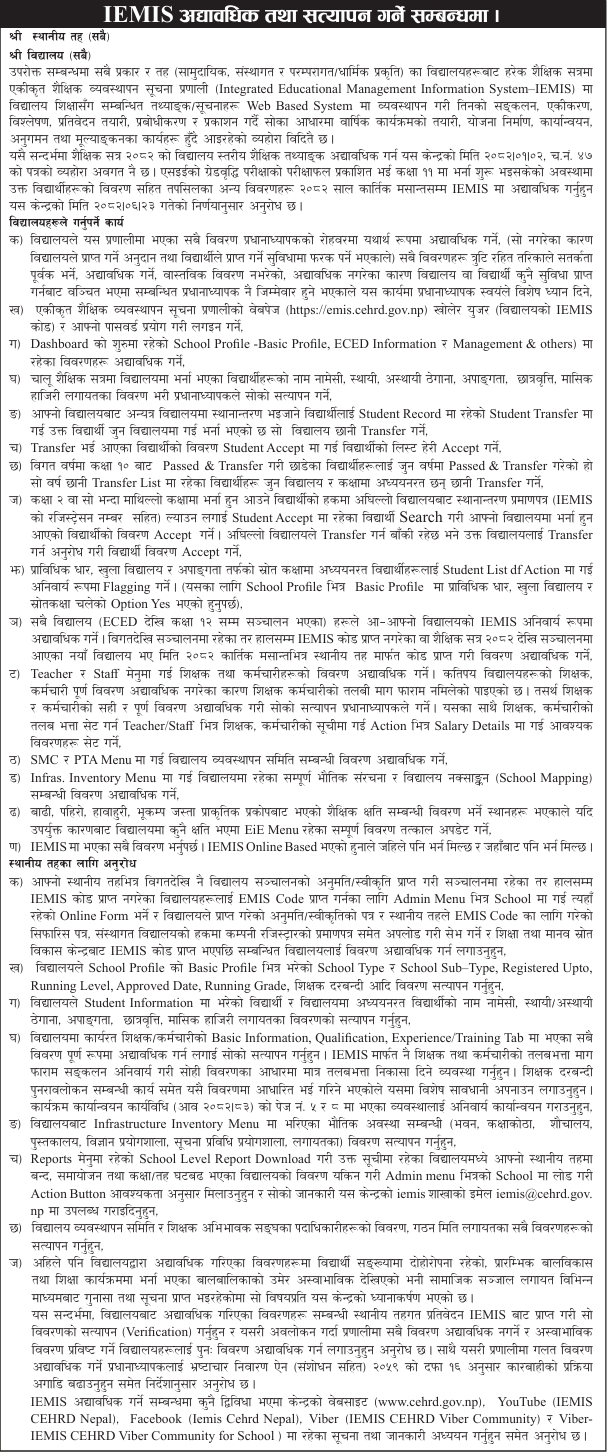

The Government of Nepal, Ministry of Education, Science and Technology, Center for Education and Human Resource Development (CEHRD), Sanothimi, Bhaktapur, has issued a notice requesting all schools and local levels across the country to update and verify school-level educational data in the Integrated Educational Management Information System (IEMIS) for the academic session 2082 by the end of Kartik 2082.
The notice reminds all types of schools-community, institutional, and traditional/religious that data updates in IEMIS are essential for planning, implementation, monitoring, and evaluation of educational programs. The process includes managing, integrating, analyzing, and reporting school data through a web-based system.
The directive follows the decision made on 2082/06/23, instructing schools to include data of newly enrolled Grade 11 students after the publication of the SEE grade increment examination results.
Schools Are Required to:
- Update all details under the supervision of the principal
Schools must ensure that all data in IEMIS is updated accurately. Any inaccuracy or failure to update may affect the grants received by the school or the benefits for students. Principals will be held responsible for any loss or discrepancy caused by incorrect or incomplete updates. - Login to the IEMIS Web Portal
Access the system via https://emis.cehrd.gov.np using the school’s IEMIS code as the username and the assigned password. - Update School Profile Information
Review and update all details available in the Dashboard under School Profile (Basic Profile, ECED Information Management, and others). - Verify Student Data
Enter and verify details such as student name list, permanent and temporary address, disability status, scholarships, and monthly attendance. The principal must authenticate all entries. - Handle Student Transfers Properly
- For students transferring to other schools, use the Student Transfer section to send records to the new school.
- For incoming students, go to Student Accept and approve their records.
- For students who passed Grade 10 in previous years and were transferred, ensure their records are properly listed in the year they transferred.
- Verify Transfer Certificates for New Admissions
For students enrolling in Grade 2 or above, ensure they bring a transfer certificate containing their IEMIS registration number. Search and accept such students’ details in Student Accept. If transfer approval from the previous school is pending, request them to complete it. - Flag Students in Special Categories
For students in technical, open schooling, or disability resource classes, go to Student List > Action and mark them accordingly. Ensure the “Yes” option for these programs is enabled in the Basic Profile. - Ensure All Schools Update Their IEMIS Data
Schools running from ECED to Grade 12 must update all information. Schools without IEMIS codes, or new schools starting in 2082, must obtain codes through the local level by the end of Kartik 2082. - Update Teacher and Staff Information
Under the Teacher/Staff menu, update complete details of all teaching and non-teaching staff. Incomplete data have previously caused mismatches in salary requests. Principals must verify all records and set salary details under Action > Salary Details. - Update School Management Committee (SMC) and PTA Details
Go to the SMC and PTA menus to update information about committee members, positions, and formation dates. - Update Infrastructure and Mapping Data
Under Infrastructure Inventory, update information about buildings, classrooms, toilets, libraries, science and ICT labs, and include school mapping details. - Report Educational Losses Due to Natural Disasters
If the school has suffered damage due to floods, landslides, windstorms, or earthquakes, immediately update the relevant details under the EiE Menu. - Continuous Updating
Since IEMIS is an online-based system, data can be entered and updated at any time from any location.
Responsibilities of Local Levels
- Assist Schools Without IEMIS Codes
For schools operating without an IEMIS code, the local level should go to Admin > School and fill the online form with the school’s approval letter and recommendation. Institutional schools must also upload the company registration certificate. - Verify Key School Information
Verify school type, sub-type, registration validity, operational level, approved date, running grades, and teacher quota in the Basic Profile section. - Validate Student Information
Ensure accuracy in student data, including names, addresses, disabilities, scholarships, and attendance. - Verify Teacher and Staff Data
Check teacher and staff details, including qualifications and training. Salary requests must be processed only based on IEMIS data, and quota reviews will also rely on these verified details. - Verify Infrastructure Information
Review and confirm the accuracy of data related to school buildings, classrooms, toilets, libraries, laboratories, and other facilities. - Update Closed or Merged School Information
Download the School Level Report from the Reports menu, identify closed or merged schools, and update their status under Admin > School. Inform the CEHRD IEMIS branch via email at iemis@cehrd.gov.np. - Verify SMC and PTA Information
Ensure all details related to the formation date and members of the School Management Committees and PTAs are accurate.
The CEHRD noted that some schools have duplicate student records and abnormal age entries, especially in ECED data. Local levels must verify and direct such schools to correct their information.
Principals providing false data will face action under Section 16 of the Corruption Prevention Act, 2059 (with amendments).
For Assistance and Guidance
Schools and local levels can find help and updates through the following platforms:
- Website: www.cehrd.gov.np
- YouTube: IEMIS CEHRD Nepal
- Facebook: IEMIS CEHRD Nepal
- Viber Communities:
- IEMIS CEHRD Viber Community
- IEMIS CEHRD Viber Community for Schools
The content above is an unofficial translation of the official document. View the official notice below